
TECH TIPS:
Need help reconnecting cables?
Did your kids unplug the Wi-Fi? Or maybe you're moving your computer to another room? Our FAQs make it easy to get back online. Learn how to reconnect your router, reset your equipment, troubleshoot common issues, and more!
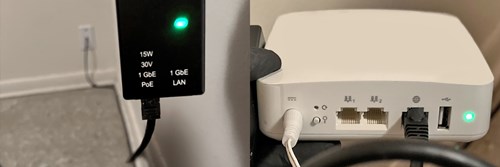
It’s easy to get your Internet reconnected using the steps below:
- Locate the cable running out of your wall. (see left image) Plug it back into the port on the small black box marked “POE” (Power over Ethernet). Make sure the box is still connected to power.
- Locate the cable running out of your computer’s LAN port. Plug it back into your white Wi-Fi Router box in the port marked with a globe icon. (see right image) Make sure the Wi-Fi Router is still connected to power.
- If you need help identifying the LAN port on your computer, consult your computer’s Users Manual or search Google.com for more information about your computer’s ports.
